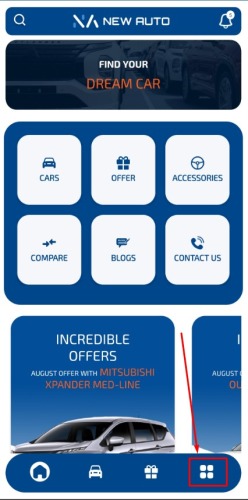
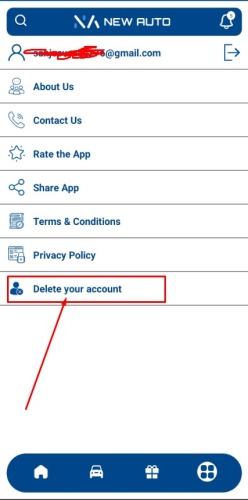
Account Deletion Steps to Delete Account from the New Auto App To delete your account from the New Auto app, follow these simple steps: 1. Open the New Auto App: Launch the New Auto app on your mobile device. 2. Log in to Your Account: Enter your credentials to log in to your account. 3. Access Your Profile: Tap on the profile icon located at the bottom right corner of the screen to access your profile. 4. Find the Delete Account Option: Scroll down through the settings until you find the “Delete Account” option. 5. Initiate Account Deletion: Tap on “Delete Account”. A confirmation prompt will appear asking if you are sure you want to delete your account. 6. Confirm Deletion: Confirm your decision by tapping “Yes” or “Confirm”. This will start the account deletion process. 7. Account Deleted: You will receive a notification confirming that your account has been successfully deleted. If you encounter any issues or need further assistance, please contact our support team. Data Deleted Successfully Lorem Ipsum is simply dummy text of the printing and typesetting industry. Go To Home Page